Audio Augmentation Techniques for Deep Learning
Six ways to stretch a small audio dataset, with the code I use.

Phanith LIM
When you do not have enough audio to train on, you make more out of what you have. Add some noise, speed a clip up, shift its pitch: the words stay the same, so the label stays the same, but the model sees a new example.
That is audio augmentation. It is cheaper than collecting more recordings, and it stops a model from memorising the quirks of the few recordings it has.
Here are the six transformations I keep coming back to.
1. Noise injection
Real recordings are never clean. Adding random noise to a clip teaches the model to listen past a fan, a street, a bad microphone.
The noise comes from a distribution, and the two I use are the normal and the uniform distribution:
| Normal Distribution | Uniform Distribution |
|---|---|
| Depicted as a bell curve. | Depicted as a flat, horizontal line. |
| Probability is concentrated around the mean. | Probability is spread evenly across a range. |
| Values closer to the mean are more likely. | All values within the range are equally likely. |
| Represented by a peak at the mean, with tails. | Represented by a flat line indicating constant probability. |
| Gaussian noise is generated using the normal distribution. | Uniform noise is generated using the uniform distribution. |
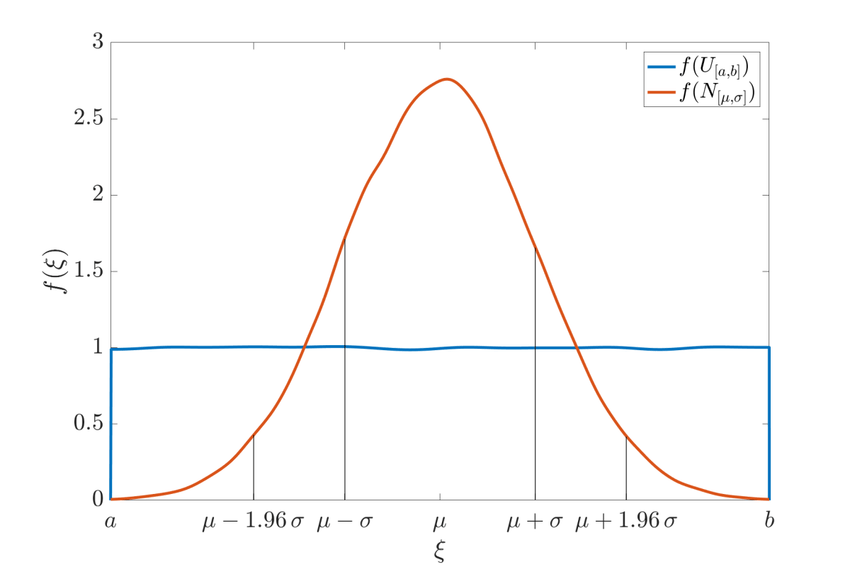
Comparison of Normal and Uniform Distributions
Think of a classroom. Gaussian noise is the air conditioner humming in the background: constant, and easy enough to listen past.
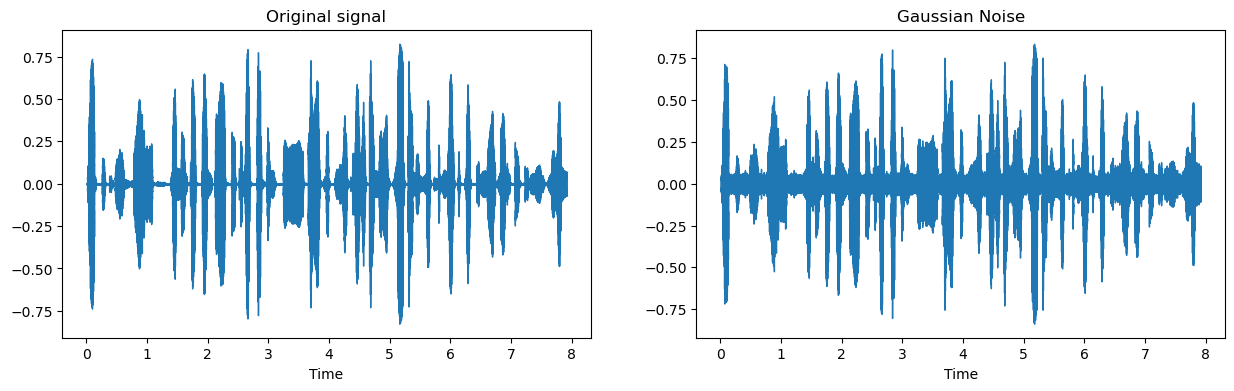
Gaussian noise added to the original signal
Uniform noise is a sudden clap. It cuts across the teacher's voice, and the student (the model) loses the word.
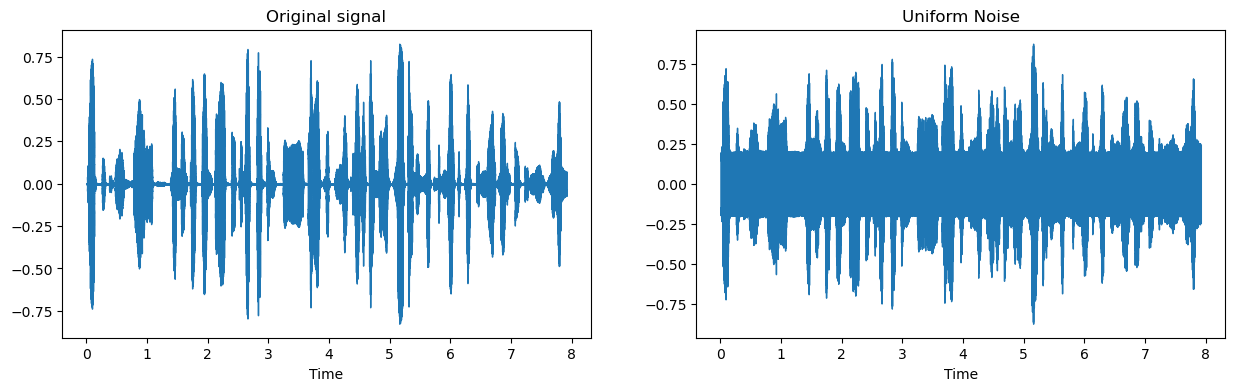
Uniform noise added to the original signal
The formula is just an addition:
Noisy Signal = Original Signal + (Noise Amplitude * Random Noise)
To see what any augmentation did, plot the two signals side by side:
def _plot_signal_and_augmented_signal(signal, augmented_signal, sr):
    fig, ax = plt.subplots(ncols=2, figsize=(15, 4))
    librosa.display.waveshow(signal, sr=sr, ax=ax[0])
    ax[0].set(title="Original signal")
    librosa.display.waveshow(augmented_signal, sr=sr, ax=ax[1])
    ax[1].set(title="Augmentation signal")
    plt.show()
And the noise itself:
def add_white_noise(signal, noise_percentage_factor):
    noise = np.random.normal(loc=0, scale=signal.std(), size=signal.shape)
    augmented_signal = signal + noise * noise_percentage_factor
    return augmented_signal
signal is the audio as a NumPy array. noise_percentage_factor is how loud the noise should be.
Two choices in that function are worth explaining.
Why scale the noise by the signal's standard deviation? Because the noise has to be loud enough to matter and quiet enough to leave the speech intact. The standard deviation ties it to the volume of this particular clip, so the same code works on a whisper and on a shout.
Why loc=0? A mean of zero means the noise pushes the waveform up as often as it pushes it down. Any other mean would shift the whole signal in one direction and change its amplitude, which is not what you want.
2. Time stretching
Time stretching changes how fast a clip plays without changing its pitch. People speak at different speeds, and this is how you show the model that.
def time_stretch(signal, time_stretch_rate):
    """Time stretching using librosa"""
    augmented_signal = librosa.effects.time_stretch(signal, rate=time_stretch_rate)  # Specify rate
    return augmented_signal
With time_stretch_rate > 1 the clip gets shorter and faster:
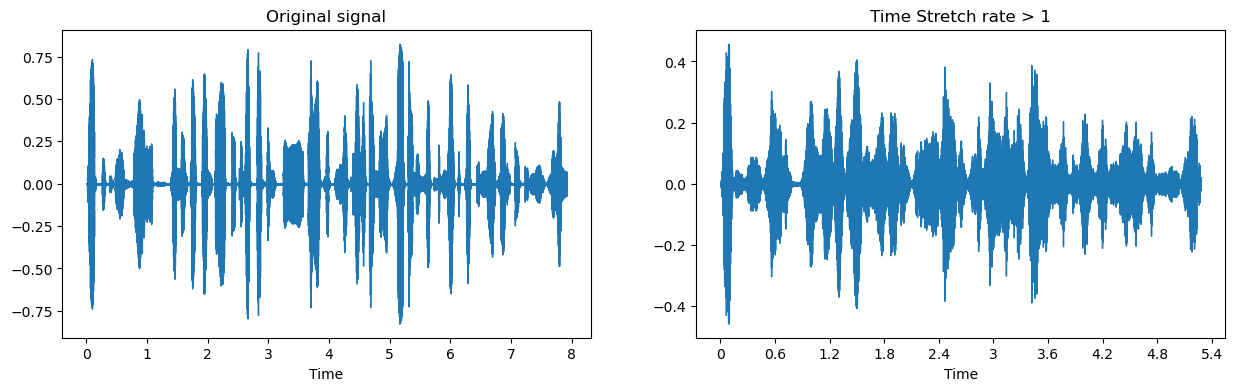
Compressed (faster) signal with time_stretch_rate > 1
With time_stretch_rate < 1 it gets longer and slower:
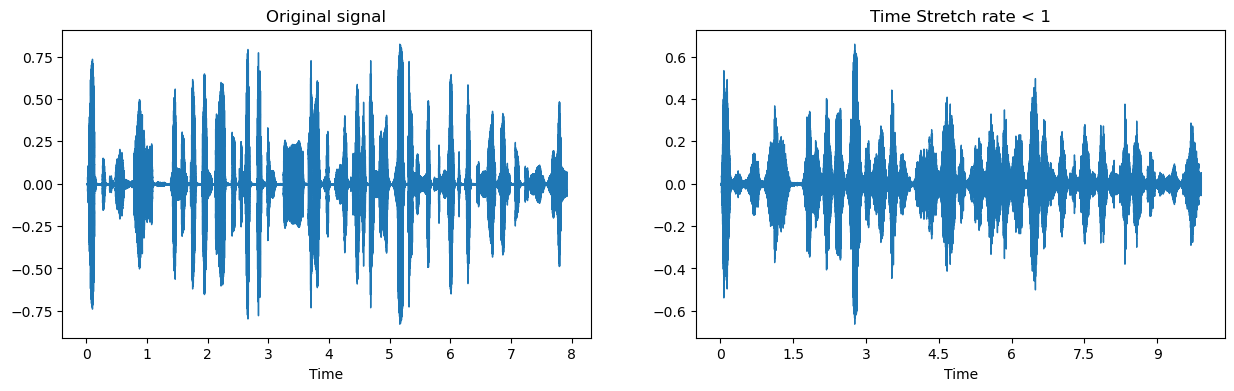
Expanded (slower) signal with time_stretch_rate < 1
3. Pitch scaling
Pitch scaling moves the pitch and leaves the speed alone, so a high voice becomes a lower one, or the other way around.
def pitch_scale(signal, sr, num_semitones):
    """Pitch scaling using librosa"""
    augmented_signal = librosa.effects.pitch_shift(signal, sr=sr, n_steps= num_semitones)
    return augmented_signal
signal: audio as a NumPy array.sr: sampling rate, for example 44,100 Hz.num_semitones: how far to shift:+4raises the pitch by four semitones,-3lowers it by three.
4. Random gain
Gain is volume. Multiplying a clip by a random factor gives the model quiet recordings and loud ones from the same source.
def random_gain(signal, min_factor=0.1, max_factor=0.12):
    gain_rate = random.uniform(min_factor, max_factor)
    augmented_signal = signal * gain_rate
    return augmented_signal
signal: audio as a NumPy array.min_factor: quietest allowed, for example0.5for half volume.max_factor: loudest allowed, for example1.5.
5. Inverting polarity
Multiply the signal by -1 and the waveform flips: peaks become troughs, troughs become peaks. It sounds identical on its own, and that is the point. What changes is how it behaves when mixed with the original.
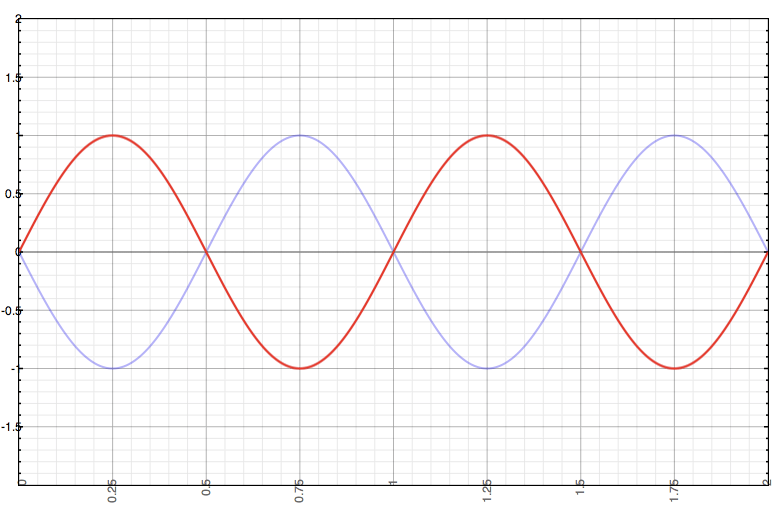
Inverted polarity: peaks become troughs and vice versa
def invert_polarity(signal):
    return signal * -1,
Where polarity inversion earns its keep:
- Cancelling noise by phase inversion.
- Fixing phase problems in stereo or multi-channel audio.
- Pulling vocals out for a karaoke or instrumental track.
- Building sound effects.
- Cutting feedback in live performances.
6. Stacking them
The transformations compose. Noise plus a time stretch plus a pitch shift gives you a clip that is further from the original than any single one of them, which is usually what you want from a small dataset. Just keep it plausible: if the result sounds like nothing a real microphone would ever record, the model learns from something it will never meet.
print("Thank you for reading!")